
How Lens works
Lens visits your site the way a buyer's AI agent would, keeps everything it sees, and scores it against a published rubric.
1The visit
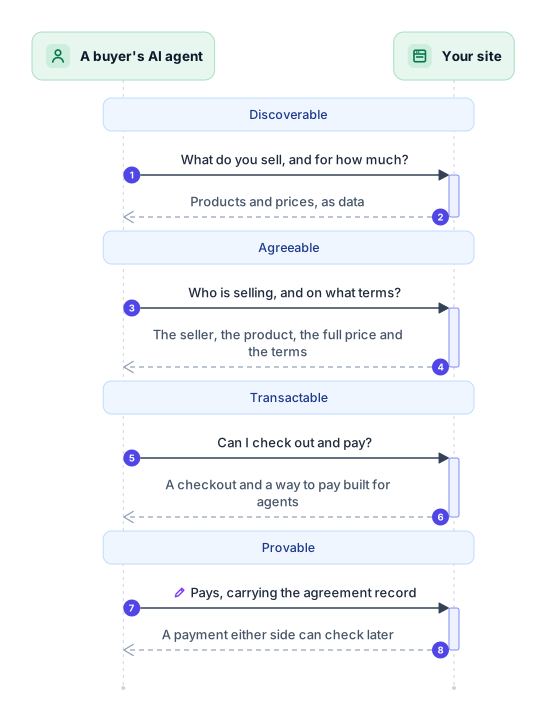
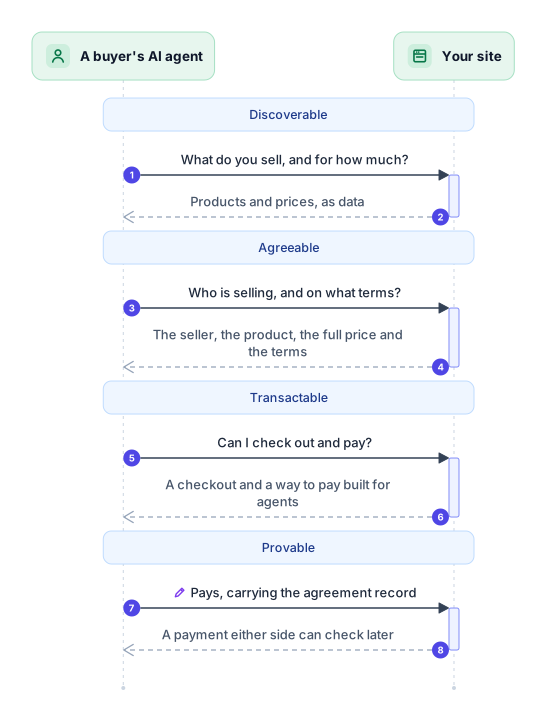
- Discoverable. A buyer's AI agent: What do you sell, and for how much? Your site: Products and prices, as data
- Agreeable. A buyer's AI agent: Who is selling, and on what terms? Your site: The seller, the product, the full price and the terms
- Transactable. A buyer's AI agent: Can I check out and pay? Your site: A checkout and a way to pay built for agents
- Provable. A buyer's AI agent: Pays, carrying the agreement record Your site: A payment either side can check later
A buyer's AI agent starts with your address and nothing else. It needs four answers, in this order. Lens asks the same things, and stops before it would pay.
Click a stage in the diagram to see what it asks and what Lens checks.
Discoverable
Can AI agents find what you sell?
- The agent asks
- What do you sell, and for how much?
- Your site answers
- Products and prices, as data
- What Lens checks
- 2 checks in Catalog and Access
Agents get in and read your products and prices as data.
An agent starts with your address and nothing else.
See these checks in the rubricAgreeable
Do AI agents know what they would agree to?
- The agent asks
- Who is selling, and on what terms?
- Your site answers
- The seller, the product, the full price and the terms
- What Lens checks
- 9 checks in Terms, Seller, Product and Price
Agents know who sells what, for how much, and on what terms.
Before it commits someone's money, an agent needs the seller, the exact product, the full price and the terms.
See these checks in the rubricTransactable
Can AI agents buy without a browser?
- The agent asks
- Can I check out and pay?
- Your site answers
- A checkout and a way to pay built for agents
- What Lens checks
- 2 checks in Purchase
Agents can check out and pay through an interface built for them.
An agent needs a checkout it can complete without a browser, and a way to pay built for agents.
See these checks in the rubricProvable
Can both sides prove what was agreed?
- The agent asks
- Pays, carrying the agreement record
- Your site answers
- A payment either side can check later
- What Lens checks
- 3 checks in Binding and Agreement record
The payment carries a record of the agreement that anyone can check.
With no person watching, the proof of the deal has to travel with the payment.
See these checks in the rubric2Four stages
Each answer is a stage. Discoverable comes first. Agreeable and Transactable each stand on it, side by side. Provable needs both.
The exact rules: Rubric 0.3.03Checks build on each other
Say Lens finds your terms, but no date on them:
- Terms of sale AI agents can read
- Dated terms
- Versioned terms
- Terms that stay the same
- Agreeable needs the checks above this line
- Terms in a clean format
- The same terms everywhere
- Terms locked by a fingerprint
Each stage is a set of checks, in groups. In a group, each check builds on the one before, so a check after one that failed is Waiting.
Agreeable needs the first 4 Terms checks. The tick marks where that ends.
- Passed
- Lens found what this check asks for.
- To fix
- Lens did not find it. This is something to fix.
- Waiting
- This needs an earlier check on the same ladder to pass first.
- Not checked
- Lens could not check this from outside the site.
- Doesn't apply
- This check does not apply to this site.
4Evidence
- A request
- The answer, kept as it came
- Its SHA-256 hash
- The result that cites it
Lens keeps every request it makes, and every answer exactly as it came, each named by its SHA-256 hash. Each result cites the answers it rests on.
A report is named by the hash of its own bytes, so anyone can check one:
curl -s https://lens.integraledger.com/reports/<fingerprint>.json | shasum -a 256Over HTTP the same hash is in the Lens-SHA256 header. Over MCP it is in the result's _meta.
5What Lens does not do
- It never buys, pays or signs in.
- It never fills in a form or writes to your site.
- It never runs your pages' scripts or poses as a browser.
- It never ignores your robots.txt.